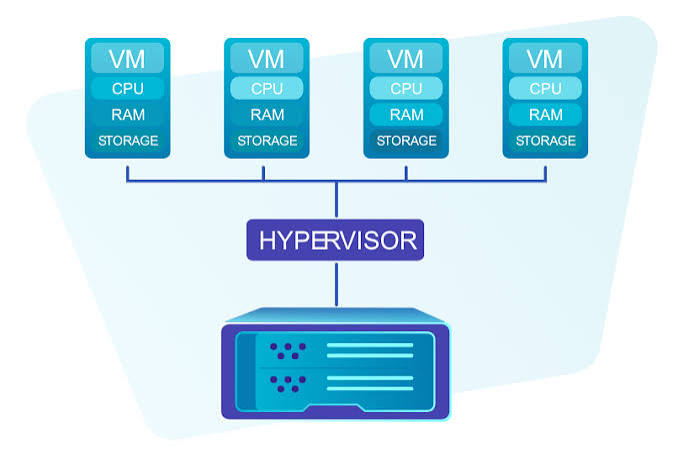

A virtual server is not valuable because it has an impressive plan name. It is valuable when the CPU, memory, storage, network policy, operating system, and administrative workload fit the application. IWIHOST presents a wide ladder of KVM plans, so the central review question is not whether the catalog is large; it is how a small team can map that catalog to a dependable architecture.
The official site lists locations across North America and Europe, NVMe storage, ECC memory, a 500 Mbps network policy, multiple Linux and Windows options, quick activation, and 24/7 support. Those are useful foundations, but the customer still owns patching, backups, firewall rules, account security, monitoring, and application recovery unless a managed service is explicitly purchased.
Understanding the plan ladder
At the low end, the Core USA plan is listed at $4.99 per month with one vCore, 1 GB of ECC RAM, and 10 GB of NVMe storage. Shield moves to two vCores, 2 GB RAM, and 30 GB NVMe at $6.99. Armor provides two vCores, 4 GB RAM, and 50 GB NVMe at $8.99. Higher tiers continue through 8, 12, 16, 24, and more vCores with progressively larger memory and storage allocations.
The lowest plan can run a small static site, VPN gateway, monitoring agent, or lightweight development utility, but 1 GB of RAM leaves little margin for a modern control panel, database, caching layer, and application stack on the same machine. For a modest WordPress site or staging environment, 2–4 GB is a more realistic starting point. For multiple containers, build jobs, or database-heavy applications, capacity should be selected from measured workload data rather than the minimum installation requirement.
A lean three-server pattern
A small team does not always need one large VPS. A cleaner design can use three modest roles: a production server, a staging or build server, and an independent monitoring or backup target. Separating roles reduces the chance that a failed deployment, runaway task, or compromised test tool affects the public website.
The production server should host only the services required to serve users. The staging server can run previews, dependency updates, and deployment rehearsals. The third system can collect uptime checks, receive encrypted backup copies, and send alerts if production stops responding. IWIHOST’s plan range makes this separation financially possible, although using one provider for all three roles still creates a provider-level dependency.
| Best operational strengthA broad KVM plan ladder at accessible entry prices. | Main trade-offServer administration remains the customer’s job. |
Location and network planning
Choose the data-center country according to the audience and application dependencies, not according to a generic claim that one region is faster. A server near users usually reduces latency, but a site may also depend on a database, object store, payment gateway, or API hosted elsewhere. Test the full request path.
IWIHOST states that plans receive 500 Mbps for the first 30 TB of monthly data and then drop to 100 Mbps until the next month. That allowance is generous for many websites and business tools, but high-volume mirrors, media delivery, or continuous large backups should be modeled explicitly. The port speed is not the same as guaranteed application throughput, which also depends on CPU, disk I/O, routing, and destination capacity.
Operating systems and deployment choices
The site lists current Windows Server releases and a broad selection of Ubuntu, Debian, FreeBSD, CentOS, Rocky Linux, AlmaLinux, and Oracle Linux versions. This flexibility helps teams standardize on an existing stack, but a longer list is not automatically better. Select an operating system with an active security lifecycle and a package ecosystem your administrators understand.
Container users should still secure the host. Docker or another runtime does not replace operating-system updates, SSH hardening, firewall policy, secret management, or resource limits. Windows workloads need the same discipline, plus license and remote-desktop considerations where applicable.
Security baseline for the first hour
Immediately after activation, create an administrative user, install security updates, configure key-based SSH or strong remote access, disable unused services, and restrict the firewall to required ports. Change any temporary credentials delivered by email or the billing panel. Enable multi-factor authentication wherever the provider supports it.
Then add monitoring for CPU saturation, memory pressure, disk usage, inode usage, network errors, and service availability. Schedule encrypted backups to a destination that is not mounted permanently on the VPS. Finally, test a restore. A backup that has never been restored is an assumption, not a recovery plan.
Support and refund promises: how to evaluate them
IWIHOST advertises activation within ten minutes, support responses in less than fifteen minutes, and a 48-hour money-back guarantee. These are useful commitments, but the practical value depends on scope. Before relying on support for an application problem, clarify whether the service is unmanaged and which infrastructure issues the team will diagnose.
During the first 48 hours, open one concise ticket about routing, reverse DNS, reinstall procedures, or another relevant platform feature. The aim is not to manufacture a complaint; it is to understand response quality, technical depth, and escalation before the server becomes critical.
Who IWIHOST is best suited for
The service is a good candidate for developers, small agencies, website operators, and remote teams that want KVM virtualization, several locations, predictable resource tiers, and the freedom to choose an operating system. The entry prices make pilots and separated environments accessible.
It is not a substitute for a fully managed platform, automatic application scaling, or a multi-region architecture. Teams without Linux or Windows administration experience should budget for management help rather than assuming support will operate the server on their behalf.
Final assessment
IWIHOST’s strongest quality is the clarity of its VPS ladder: buyers can move from a small low-cost instance to substantial CPU, memory, and NVMe allocations without changing the basic model. KVM and the listed regional choices provide a solid base for conventional workloads.
A high-quality result still depends on architecture and operations. Start with measured requirements, separate critical roles where practical, establish off-server backups, and test support and recovery during the initial refund window. With those controls in place, IWIHOST can be a cost-conscious foundation for a lean infrastructure stack.Source and disclosure — https://iwihost.net/ Checked August 2, 2026. Availability, prices, locations, policies, and specifications can change. Provider claims were not independently benchmarked. Use these services only for lawful, authorized